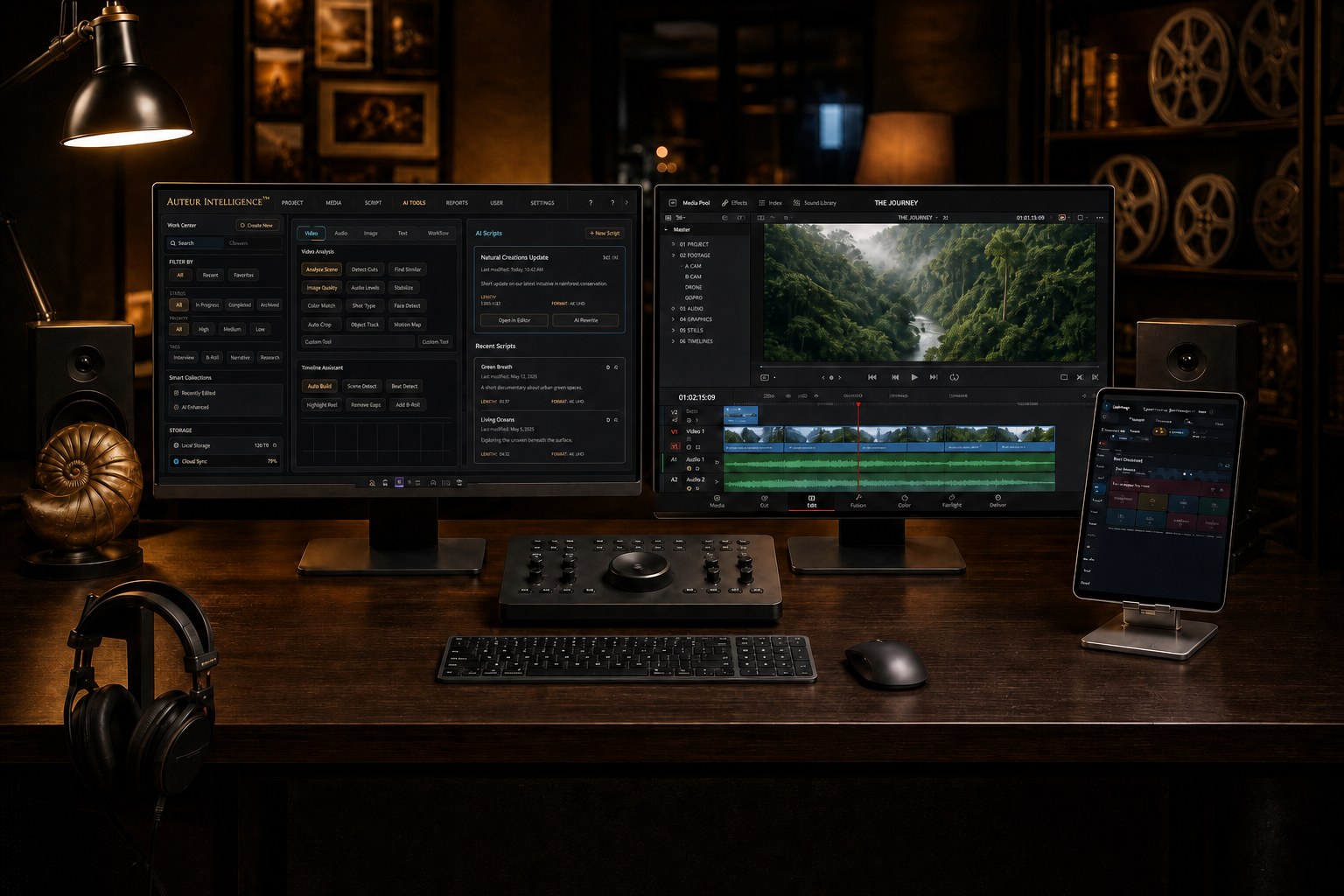
Auteur for DaVinci Resolve.
The editorial assistant that handles the repetitive work, so you keep the vision. Auteur reaches inside Blackmagic Design DaVinci Resolve, the timeline, the media pool, Fairlight, Fusion, and the color page, through a governed, review-controlled bridge. Say what you want in natural language, or take the controls yourself: the interface runs the whole spectrum from granular hands-on control to a single sentence that sets a chain of edits in motion. Every operation is staged, receipted, and constructive, new versions and new tracks, never a silent overwrite of your work.
Not another surface integration.
Plenty of tools now claim a Resolve integration. Look closely and most are surface work: an AI generator wired to a bin drop. Something lands in the media pool, and that is where the intelligence ends. No memory of where it belongs, no metadata, no sense of structure or story.
Auteur is built from the other direction. Placement, metadata, bins, timelines, and story structure are the point, and recipes wrap entire workflows into a single ask, including templated node-based Fusion work and staged Fairlight passes. This is not designed for a two-or-three-track short. It is robust assistant editorial for long-form documentary and narrative work: our own productions have run this lane against media libraries more than seventeen hundred items deep, with footage measured in dozens of hours and audio stacks twenty and thirty tracks tall that needed organizing.
And bring whatever harness you already hold, Claude Code, Codex, any seat you use today. Seating it here is the difference:
| A harness alone | The same harness, seated in Auteur |
|---|---|
| Improvises a fresh script every session | 120 catalogued tools and 42 receipted recipes, battle-tested |
| Works directly on your real timeline | Duplicate-first; deletes, moves, and ripples behind approval cards |
| Forgets your bins, canon, and past decisions | The project remembers; the work resumes where it left off |
| Checks its own work | Cross-provider review on anything that matters |
| Leaves no record | A receipt for every operation, and honest refusals |
| Scripting console only | The plugin inside Resolve, the wireless deck, the dashboard, plain language anywhere |
The beauty is width and depth at once. Granular control when you want your hands on the work, and automated pipelines that drive complex software like Resolve and Unreal Engine in plain language. Anyone with a voice can share it with the world, in natural language commands. And the software-engineered scaffolding that gives it that depth also protects your work while it runs. This is a tool for big projects.
"You're seated through my Claude Code. Use the reorganize recipe to sort the 34 tracks of my documentary audio into stem lanes: A-roll dialogue, narration, B-roll audio, foley and SFX, and music. Show me the plan card first. Once that's done, run the dialogue sweetening recipe on the A-roll dialogue, and leave receipts I can read tomorrow."
Four ways in, one governed bridge.
- The Auteur Resolve plugin, inside Resolve. Auteur rides along in the Resolve workspace itself, so the assistant is present where you cut. No app-switching, no copy-paste relay. Try asking: "Generate three background plates for this scene and stage them in the bin, while I keep cutting." And your AI-created content comes with you: what you make in the Auteur dashboard ports straight into Resolve, and unlike other platforms, ours is totally provider agnostic. Whatever your chosen image, video, or audio generator, ElevenLabs, Wavespeed pay-as-you-go, Higgsfield, Runway, Kling, or Google, you add the API, CLI, or subscription as those providers allow, and it ports into Resolve with its metadata intact.
- The wireless Control Deck, on a tablet. Pair an iPad or Android tablet with a one-time code and the deck becomes a Resolve control surface: transport, edit shortcuts, timeline, media, color, and mix rooms, each behind its own safety arm. Try asking: "Arm edit. Blade at the playhead, ripple the gap, and warm this clip two points, from the couch."
- The desktop studio. The same project that wrote the manuscript and generated the boards stages media into Resolve and reads the state back. Try asking: "Stage tonight's renders into the inbox and show me what changed on the timeline since lunch."
- Anywhere, in natural language. The governed messenger lane carries approvals and status to wherever you are; the studio does the walking. Try asking: "Text me when the render lands. If I reply approve, put it on the timeline."
By filmmakers, for filmmakers
This application was designed and built from the ground up by professional filmmakers, writers, and working professionals who use AI in real-world scenarios in their daily workflows, and who needed better, more reliable solutions than the market offered. Its founder has spent over 25 years in the film industry as a writer, director, and editor of award-winning feature narrative films and documentaries. It is built the way an editor actually works, because its builders actually edit.
“Review 42 reenactment shots across four AI providers, keep only the successful takes, add custom metadata, organize them into the correct Resolve bins, and build the scene chronologically, with the best alternate takes stacked on the timeline.”
An actual request from this studio’s own production, run through a Codex seat, delivered into Resolve.
One library. Any provider.
Auteur does not care who made the asset. Runway can mingle with Higgsfield, Midjourney with Google Veo, local ComfyUI running LTX 2.5 beside Minimax H3, all on the same canvas, with the same capabilities. Footage you already had sits next to what you generated this morning. Every asset lands in one shared media library, instantly searchable, and instantly round-trippable to your Blackmagic Design DaVinci Resolve project with organized, custom metadata you could not get from single accounts alone.
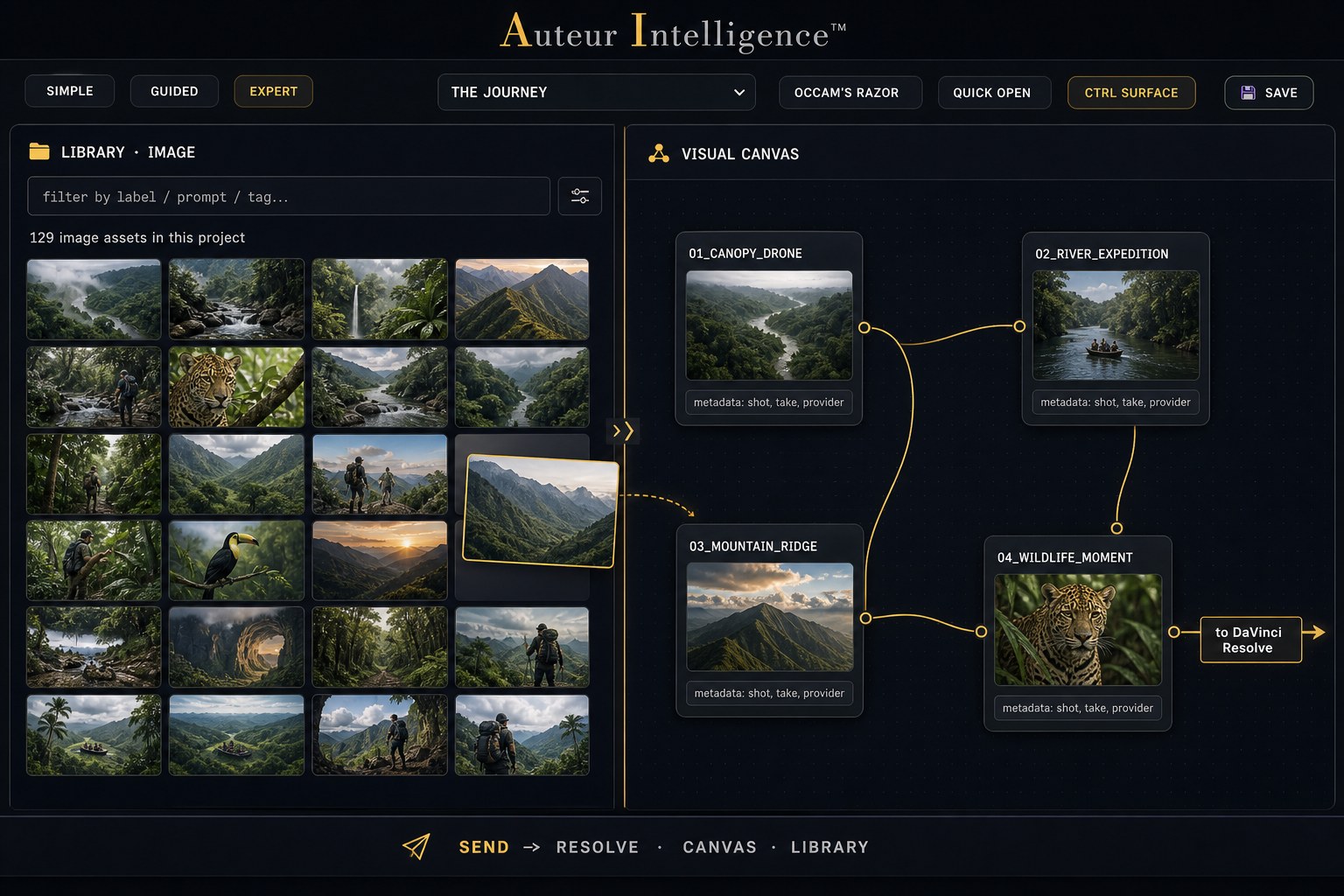
The library and the Visual Canvas work as one surface. Drag an asset from the library onto any canvas, storyboard, or comic panel in any project, and drag results back. Share assets between projects without ever closing one or the other. The metadata rides along, built from the start for Resolve round-tripping.
This exists because it hurt. The Auteur founder, cutting large documentary and narrative projects as an editor and director, kept losing assets across multiple AI generation accounts: which take worked best, which account made it, which version was approved. Unraveling that and getting the right footage onto a timeline took hours. So we made the studio stop caring. A local classifier with vision looks at every asset as it arrives, pre-existing or freshly generated, whoever made it, and writes the base metadata every lane shares. The same search finds it from any of your harnesses, from a single term typed into the Auteur dashboard, or from inside DaVinci Resolve.
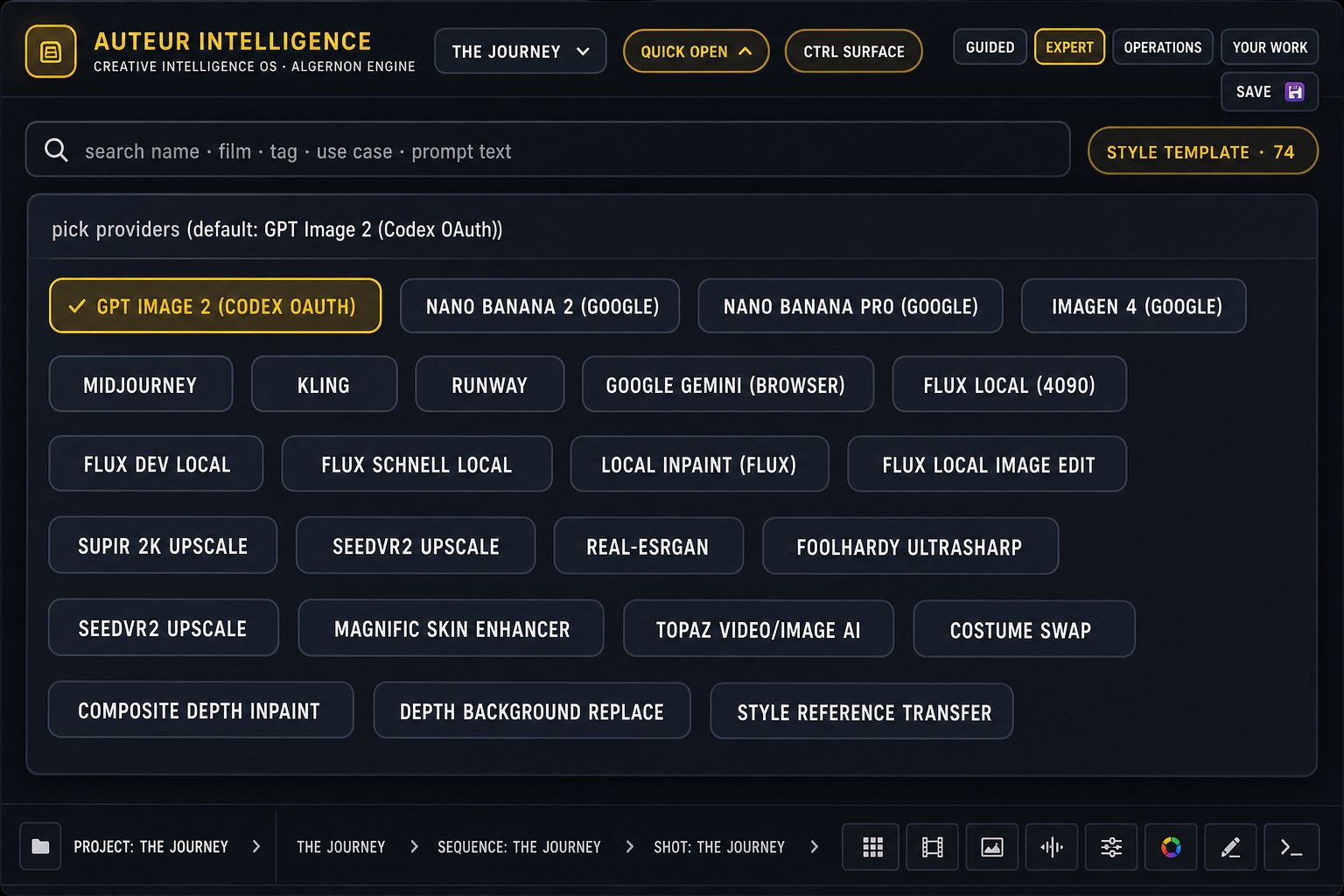
"Pull every river shot I approved across the last three projects, whoever generated them, and stage the best six as a storyboard for the opening."
Prompt Studio: the recipe shelf
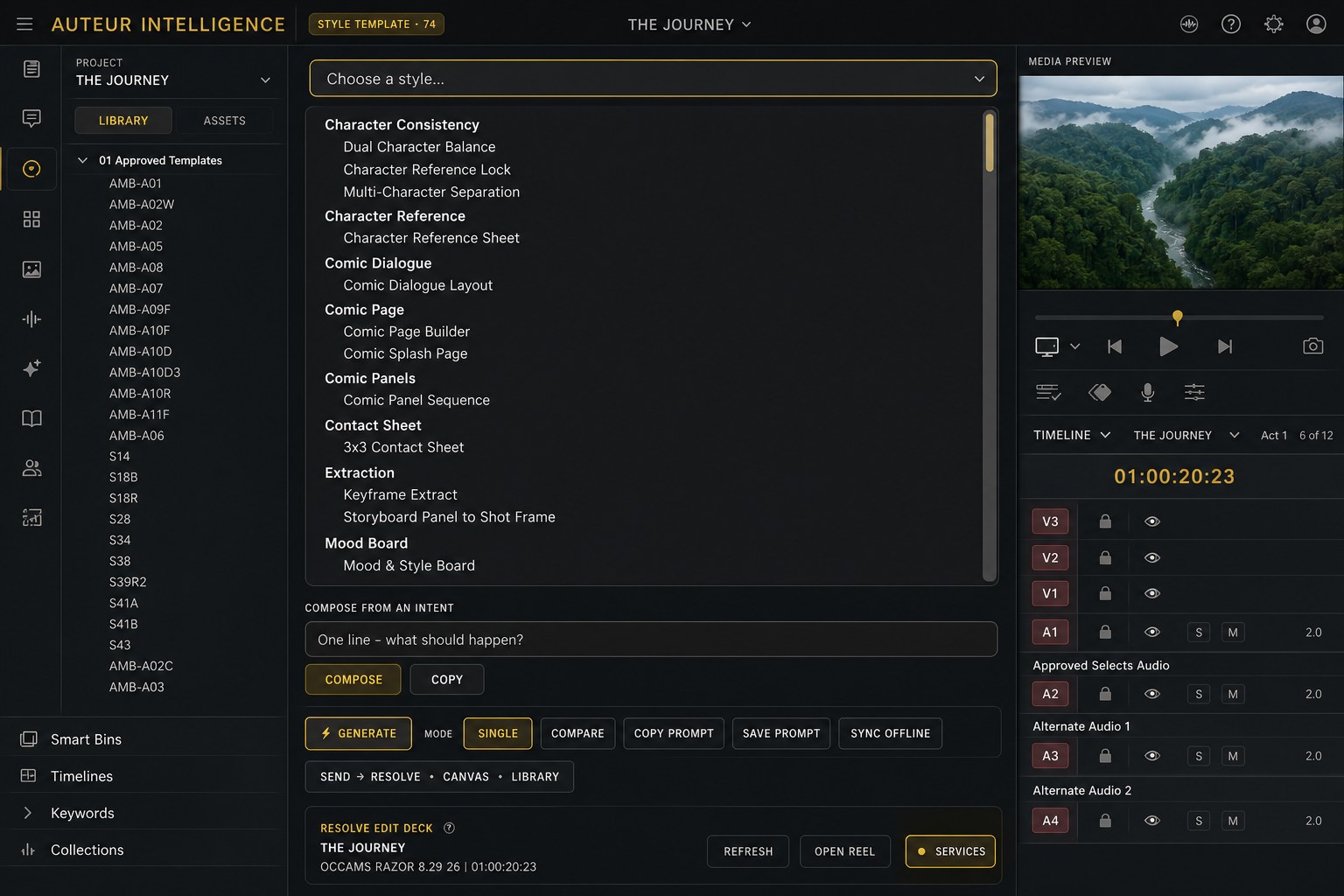
Prompt Studio ships with 74 in-house style templates on the shelf today: character consistency locks, comic page builders, contact sheets, keyframe extraction, storyboard-to-shot conversion, mood boards, and more, each one a production recipe that took real hours to learn. Audio, video, and musical composition recipes join the shelf when you hook in a provider you already hold: ElevenLabs or Fish Audio for voice and sound, Ace Studio for musical composition. Describe an intent in one line and the studio composes the full production prompt for the provider you picked.
Auteur Resolve, inside Resolve
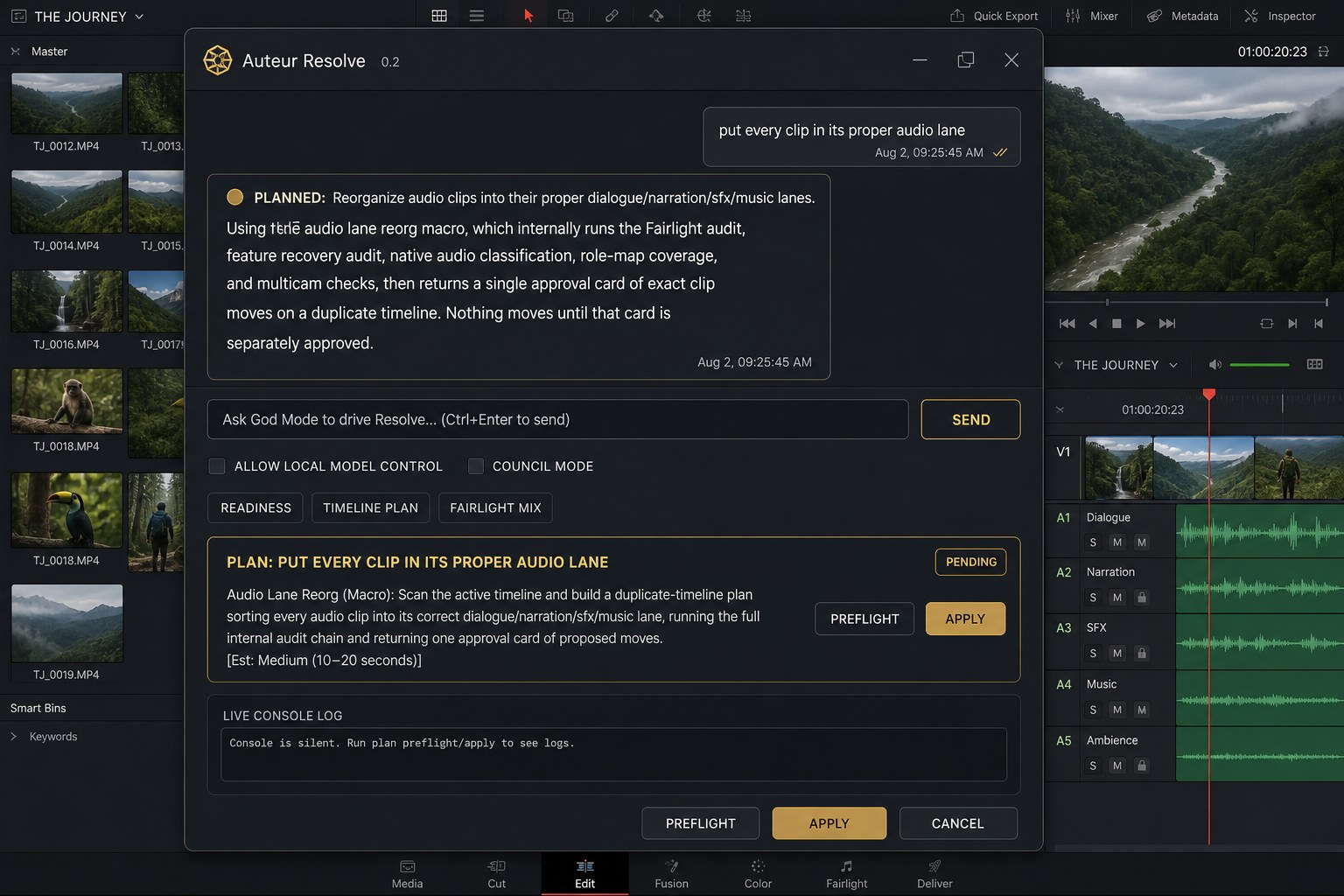
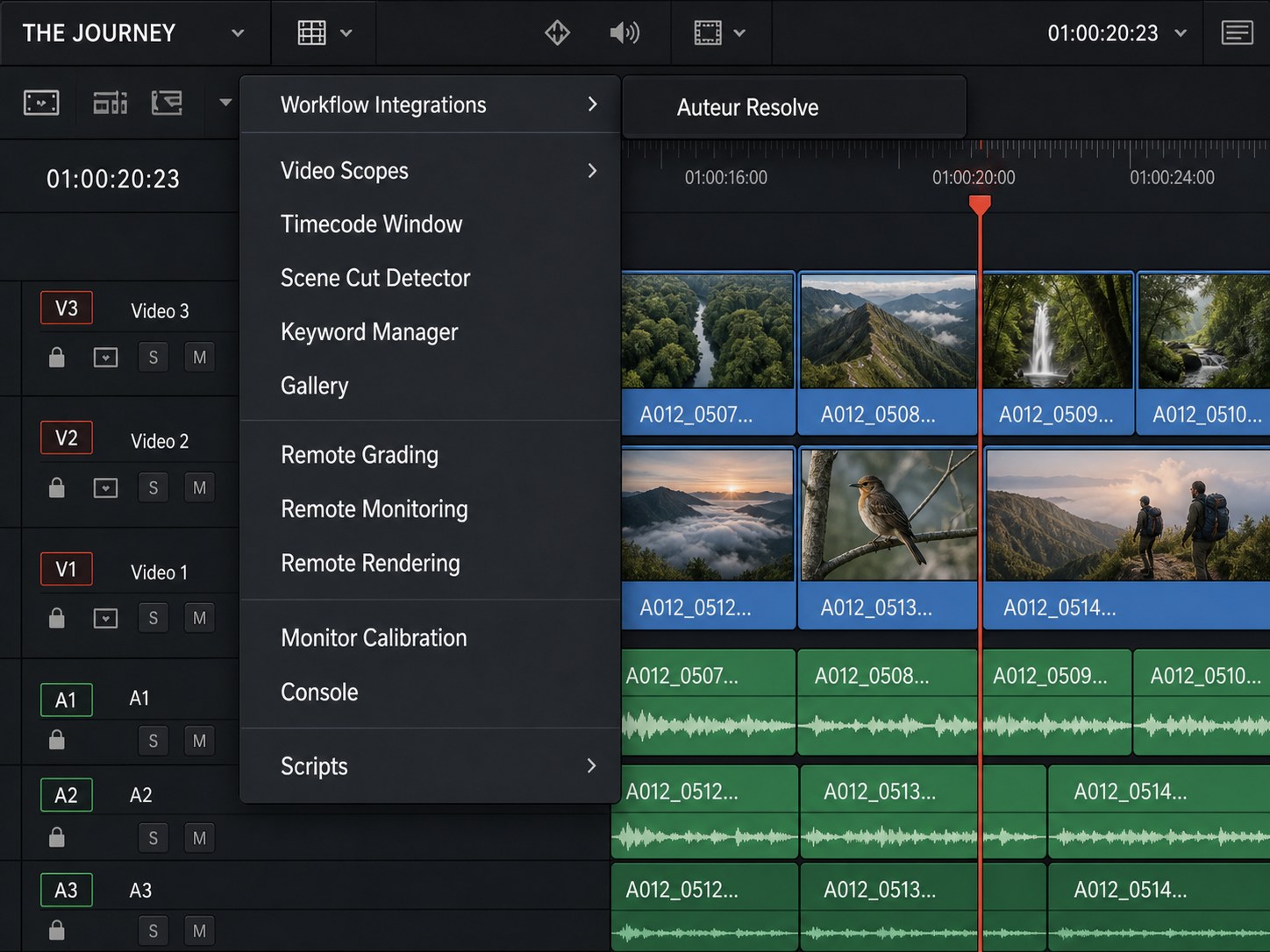
If you would rather live inside the editor, the same functionality ships as a workspace integration plugin that runs inside DaVinci Resolve itself: Workspace, Workflow Integrations, Auteur Resolve. The panel speaks the same natural language, plans before it touches anything, and nothing moves until you approve the plan card. The shared metadata layer means the library search that works in your harness works here too.
What a recipe is.
A recipe is a premade, named chain of editorial steps, the kind of work an assistant editor does with a checklist and an afternoon, packaged so the engine can run it under your approval gates. You pick the recipe (or just describe what you want and the intent resolver picks it), the engine builds a typed plan, a non-mutating preflight proves the plan against your actual project, and only then does anything run. The receipts show exactly what was done to which clips.
The catalog today: 42 Resolve recipes, picture, edit, audio, delivery, graphics, metadata, and VFX families, with 25 ready to run at the current truth level, plus 25 provider-side finishing recipes for image and video work. And one honesty rule the industry could borrow: no recipe on this page is called certified until it has earned that status live, on the record. The truth ladder, planned, coded, runtime-ready, live-certified, is printed in the catalog itself.
Ask for them conversationally ("reorganize these audio lanes", "duck the music under the dialogue") from the desktop studio or from Auteur's panel inside Resolve; staged runs can then be watched, approved, or undone from the deck. Recipes propose; you approve; the timeline stays yours.
Audio, treated as a first-class lane.
The audio bench spans generation and finishing. Generated music, narration, ADR, and effects arrive from the providers you bring, and land as organized lanes, not a pile of files.
- Lane discipline, by name. A named track schema, production dialogue, narration, ADR, score, source music, hard effects, atmospheres, design sweeteners, and more, keeps audio in useful, separated lanes from canvas to timeline, so the mix stage starts organized. Generated sound is routed to the right lane automatically: an atmosphere lands on the atmos track, a riser lands with the sweeteners.
- Fairlight, verified controls only. The deck's mix room drives the Fairlight controls that Resolve's scripting surface actually exposes, and says so on the panel, rather than pretending to a mixer it does not have.
- Foley and SFX against the picture. Generate effects from the picture itself, a clip goes out, sound designed to match it comes back, audition in the AV Canvas, and send the approved take into the Resolve inbox with its lane assignment intact.
- Stems and ducking by recipe. Export stem passes per lane group, and duck music under dialogue with masking actually detected, not guessed, each a named recipe under the same approval gates as everything else.
- Documentary audio recovery. The deepest lane: a staged pipeline that audits a feature timeline's audio, classifies and role-maps every clip, and walks a gated series of preflights before any recovery mix is applied.
“Relane this timeline to the house audio schema, export dialogue and music stems, and leave the original untouched.”
Rough cuts from the page. Multicam from the stack.
Two of the heaviest assistant-editor jobs have dedicated engines behind their recipes:
- Script-driven assembly. Feed it the script and the transcripts, and the engine aligns beats to footage and builds a first-assembly plan, appending matched selects to a fresh timeline, and dropping an honest red marker that says "no footage matched, needs manual selection" wherever it could not find the moment, instead of papering over the gap.
- Selects, markers, and dead air. Find clips by marker color, lay marker batches across a timeline, and get a dead-air report that flags silence worth cutting, repetitive work measured in afternoons, done in a pass.
- Multicam, honestly. Camera angles stack to exact frames, one track per camera, ready to cut between. The one step Resolve's scripting API does not expose, creating the native switchable multicam clip, is left to you, a single click in Resolve, and the page says so rather than pretending otherwise.
And the standing rule, printed here because it is enforced in the code: the engine works non-destructively, and it asks first. Staging favors append and mark; deletes, moves, and ripple operations exist in the bridge, and every one of them runs behind an approval card on a duplicate-first workflow. Where Resolve's scripting surface truly does not reach, the engine refuses with a reason instead of faking a success. Your cut stays your cut, because nothing touches it without your yes.
Every page of Resolve, in your language.
Auteur does not stop at the edit page. Each of Resolve's rooms answers to plain language, always through the same staged, receipted bridge:
- Edit page. "Arrange my 34 timeline tracks into dialogue, narration, music, and SFX folders, then apply dialogue sweetening and ducking."
- Fairlight. "Prepare the mastering pass: plan the mix prep, export the stems, and combine them for delivery."
- Fusion. "Track the phone shot and nudge the Fusion matte a touch to the right."
- Color page. "Here is a screenshot of the look I am going for. Apply a similar grade to this scene, as a new protected version."
- Vision on the timeline. "Use vision to review this timeline, spot it for Foley, send it to ACE Studio for the Foley pass, then create a new bin and put the results there and on the timeline."
- Media pool. "Ingest the narration transcript, create the narration batch in Henry's ElevenLabs voice, and place the narration and interview A-roll onto the timeline in script order."
Every request above runs the same road: typed plan, non-mutating preflight, duplicate-first apply, your approval, receipt. Say it from the desktop, from the panel inside Resolve, or from the deck on your knee.
The Control Deck rooms.
The paired tablet is not a remote-viewer, it is a control surface with rooms, each gated by its own arm switch:
- Transport & Timeline, shuttle, step, and playhead discipline.
- Edit, blade at playhead, cut, copy, paste, undo, redo; destructive moves like ripple delete require a deliberate hold, and manual edit safety is a mode you choose, not a default you discover.
- Color Touch, CDL wheels for slope, offset, and power with saturation, where the first move creates a named, protected color version.
- Mix, Fairlight track controls with the verified-controls contract printed on the panel.
- Media & Review, what landed, what is staged, what needs eyes.
- Agent, watch a proposed run, approve it, or stop it, from the couch.
Pairing is deliberate: a one-time code issued from the workstation, a session you can see, a revoke button that works.
Duplicate first. Receipts always.
The bridge's standing rule: work lands on duplicates, a staged copy of your timeline, and going live is a deliberate act that requires typing the phrase APPLY LIVE. Deletes on the deck take a deliberate hold. Color passes start protected versions. Undo routes exist on every surface that can apply. A sentinel watches the Resolve host and refuses mutations when the host is not healthy, and if the project or timeline drifts between preflight and apply, the run stops instead of guessing. Every operation writes a receipt, so the question "what did it do to my timeline?" always has an exact answer.
In and out, intact.
Media flows in through a watched inbox that Resolve auto-imports from, and project state reads back out, so the engine knows what is actually on the timeline rather than guessing. A cut can step out to the AV Canvas for generated picture and sound work, then graduate back, organized, labeled, and in its lanes.
The numbers under the hood.
One requirement up front: Auteur works with DaVinci Resolve Studio, the paid edition, which you purchase from Blackmagic Design yourself. The free edition does not expose the scripting surface our bridge and plugin build on.
The operations catalog behind the studio lists 120 Resolve tools, the single largest surface of the 54 in the catalog, spanning timeline, media, Fairlight, scoring, rendering, and recipes, exercised by a battery of Resolve-focused test files and canary runs whose reports live in the repository. This is not a demo integration; it is the deepest lane in the engine.
As hands-on as you want to be.
The whole integration honors one design rule: granular control and natural language are the same system at different zoom levels. Grab the wheels, or say "warm up the interview two points and quiet the room tone", either way it runs through the same gates, writes the same receipts, and leaves you holding the same versioned, recoverable timeline.